Linux host
A mini PC, old desktop, NAS, Raspberry Pi, or dedicated server.
At some point you get tired of paying for five subscriptions, each with their own privacy policy, and you start wondering: could I just run this myself? Turns out, yes. The self-hosting community has built strong alternatives to Google Photos, Netflix, Dropbox, and more. Here are the ones actually worth running in 2026.
A mini PC, old desktop, NAS, Raspberry Pi, or dedicated server.
Run services such as Jellyfin, Immich, Pi-hole, Home Assistant, and Nextcloud.
Keep media, backups, app data, and shared folders visible.
Watch CPU, memory, disk, and network activity while services run.
Keep command-line control nearby for maintenance and troubleshooting.
Jellyfin is what you install when you're done paying for Netflix. It runs entirely on your hardware, transcodes to any device, and doesn't require a Plex account or phone home. Hardware transcoding works out of the box on Intel Quick Sync (N100, N5095) — an N100 mini PC handles 2-3 simultaneous 1080p transcodes without breaking a sweat. Plex is smoother on TV apps and has better client polish, but the free tier has limitations and requires a Plex account. Emby is a reasonable middle ground if you want something between the two.
Immich is the closest thing to a self-hosted Google Photos. The mobile app backs up photos and videos automatically, face recognition works well, and the UI feels modern rather than janky. It's under very active development — the team ships frequently. Budget at least 4GB of RAM for Immich if you want machine learning features (face detection, CLIP search) running smoothly. PhotoPrism is slower to develop but has excellent EXIF and location metadata support — better if you have a large archive of RAW files you want to organize.
Nextcloud is the self-hosted alternative to Google Drive — file sync, shared folders, calendar, contacts, and a large plugin ecosystem. It's feature-rich but can be heavy to run and update. Syncthing does one thing: fast, peer-to-peer file sync between your devices with no server in the middle. Use Nextcloud when you want a web interface, sharing links, and CalDAV/CardDAV. Use Syncthing when you just want files to reliably sync between your laptop, phone, and home server without managing a web app.
Pi-hole and AdGuard Home sit between your home network and the internet, blocking ads and trackers at the DNS level — every device benefits, including your phone and smart TV, without installing a browser extension. AdGuard Home has a cleaner dashboard and DNS-over-HTTPS built in out of the box; Pi-hole has a larger community and more community blocklists. WireGuard is the VPN you want for accessing your home server from outside — much faster than OpenVPN, and most modern routers support it natively. Pair it with Nginx Proxy Manager to expose services with HTTPS without touching the command line.
Home Assistant is the most capable self-hosted home automation platform, and one of the most impressive open-source projects running. It integrates with thousands of devices: Philips Hue, IKEA Tradfri, Z-Wave, Zigbee, Ecobee, Nest, and an enormous long tail of smart home hardware. Automations run locally, so your lights still work when the internet is down. The learning curve is real, but once it's set up, it's extraordinarily powerful. Running it as a Docker Compose container works well alongside other services.
Vaultwarden is a community-built Bitwarden server written in Rust — tiny resource footprint, runs all official Bitwarden clients (browser extensions, mobile apps, desktop apps) without modification. It's the password manager app you set up once and forget about, except it's running on your own hardware. Paperless-ngx scans, OCRs, and auto-tags your documents into a searchable archive — a real change for anyone buried in paper. Gitea is a lightweight GitHub-alike: repos, issues, pull requests, and Actions, light enough to run on a Raspberry Pi.
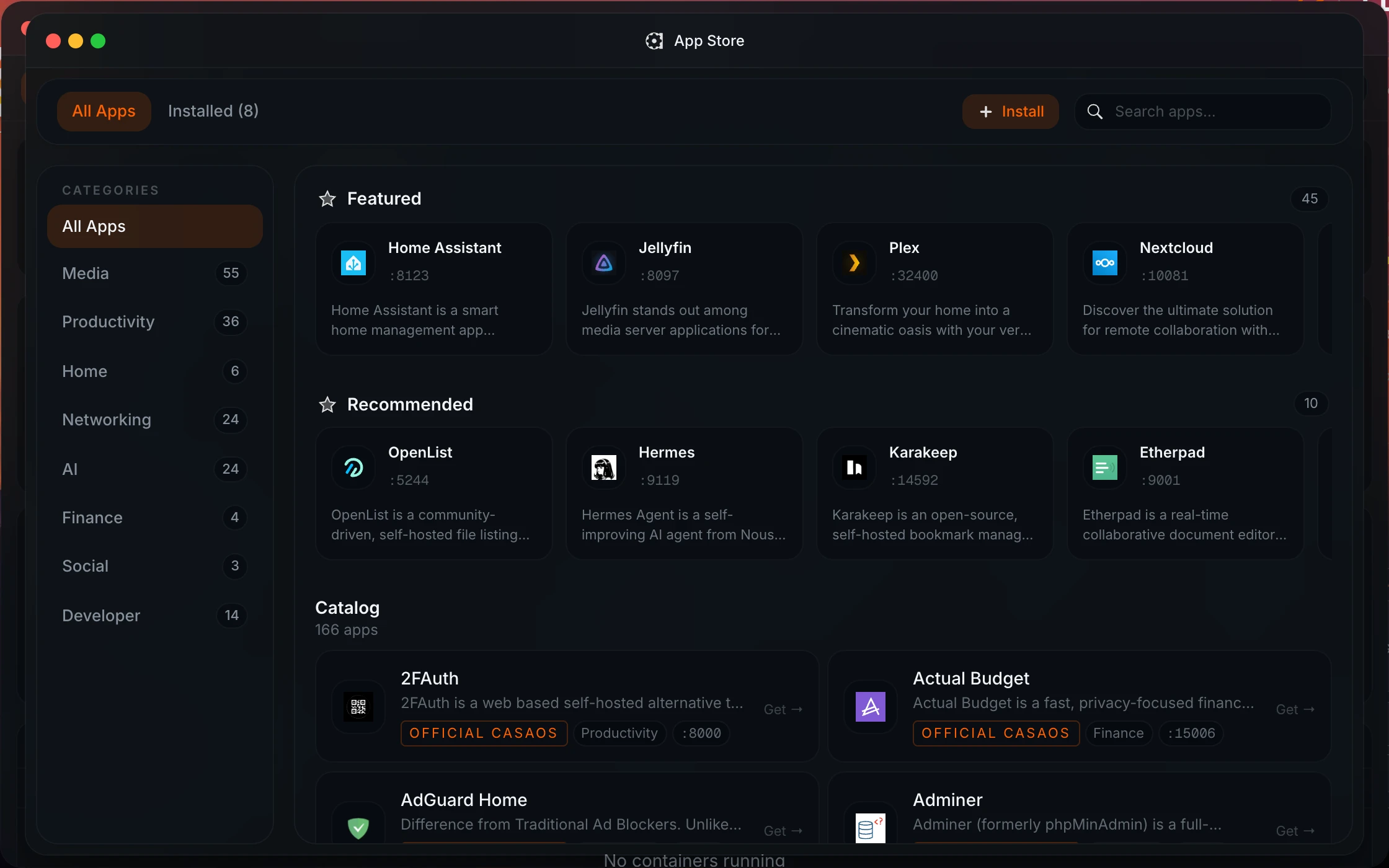
All of these except Paperless-ngx are in Homeio's default catalog, WireGuard as wg-easy; for Paperless-ngx, paste its compose file and it installs as a custom app. Installing is the easy part. Keeping six apps healthy for a year is the work: per-container stats show which one is eating CPU, a scheduled task pulls new images each week so updates are a click, the weekly backup covers every app's data folder, and the file manager reaches those folders without SSH.
Jellyfin, Pi-hole, and Home Assistant consistently show up at the top of self-hosting community surveys. Jellyfin because cutting streaming subscriptions has obvious financial appeal, Pi-hole because the whole network benefits immediately with zero per-device configuration, and Home Assistant because it's the only serious option for local-first home automation that actually works across brands.
Start with two or three apps, learn updates and backups, then expand. Running too many services too early makes troubleshooting harder.
It depends on what you're running. A Raspberry Pi 4 (4GB) handles Pi-hole, Vaultwarden, Gitea, AdGuard Home, and Syncthing comfortably. For Jellyfin with hardware transcoding or Immich with face detection, you want something more capable — an Intel N100 mini PC (~$150-200) handles 2-3 simultaneous 1080p transcodes via Quick Sync and runs Immich's ML features with room to spare. An old Core i5 desktop with a spare GPU also works well. Avoid CPU-only transcoding on a Pi for anything beyond 1080p direct play.
Most are fully free and open source: Jellyfin, Immich, Nextcloud, Pi-hole, AdGuard Home, WireGuard, Home Assistant, Vaultwarden, Paperless-ngx, and Gitea cost nothing. Plex needs a paid Plex Pass for hardware transcoding and offline sync, and since 2025 for streaming your own media away from home. Its prices went up in 2025, so check the current price before you commit. Emby has a similar paid tier. Everything else on this list is free.
Every app on this list publishes a Docker Compose file. The manual path is: copy the compose file, create a .env for your config, run docker compose up -d. That works, but it gets tedious when you're managing six apps. Using a dashboard like Homeio, you browse the app catalog, click install, fill in a few environment variables, and it's running — with logs, update checks and restarts in the same window.
Immich, and it's not particularly close right now. It has the best mobile app for automatic backup, face recognition that actually works, shared albums, a map view, and a UI that feels modern. The project moves fast — new features ship every few weeks. Just make sure your hardware has enough RAM for the ML features: 4GB minimum, 8GB if you want smooth face detection on a large photo library.
Nextcloud for the full Dropbox experience: web interface, sharing links, CalDAV/CardDAV, desktop and mobile sync clients. Syncthing if you just want reliable device-to-device file sync without a web app to maintain — it's simpler, faster, and nearly zero maintenance once configured. If you're unsure, start with Syncthing. It's harder to break.