
Homeio
Homeio
YunoHostYunoHostvsHomeioHomeio

Alternative to YunoHost

YunoHost alternative for Docker-first self-hosters.

YunoHost doesn't use Docker — it has its own Debian-based packaging system, which means app updates are slower, config files live in unexpected places, and running anything outside their catalog requires manual work. Homeio runs standard Docker Compose on top of your existing Linux system. The whole ecosystem — linuxserver.io images, awesome-selfhosted apps, any docker-compose.yml from GitHub — just works.

  • Runs on your existing Debian or Ubuntu install — no OS reinstall, no system takeover, no restructuring.
  • Standard Docker Compose for every app: readable, portable, debuggable, and compatible with the entire self-hosting ecosystem.
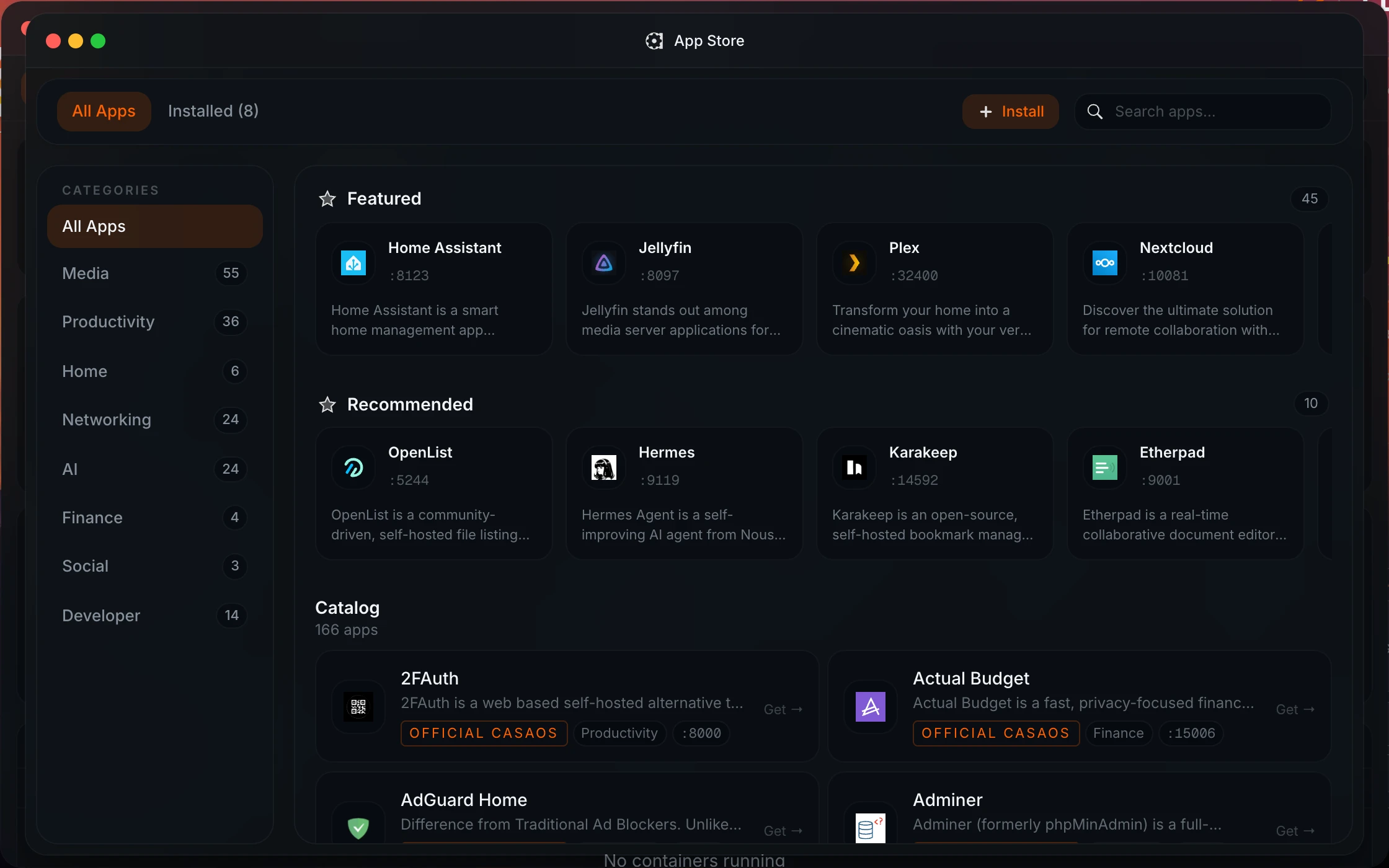
  • 158+ pre-configured apps in the built-in store, plus any Docker image on Docker Hub — no packaging bottleneck.
  • Integrated file manager with USB drive support, Samba/SMB sharing, and Google Drive side-by-side.
  • Built-in cron scheduler for app restarts, image pulls, shell commands, and backups with pass/fail notifications.
  • Real-time system monitoring: CPU, memory, disk, network, and per-container Docker stats.
  • Live container log streaming with level badges and keyword filter — debug a failing service without SSH.
homeio.app
Homeio app store as a Docker-native alternative to YunoHost

Why Homeio works

Choose Homeio if you want a stronger daily operating surface.

NeedWhy Homeio fits
No OS restructuring

Homeio installs on your existing Linux system as a Docker Compose stack. Your OS, config files, and other services stay exactly as they are.

Apps from the full ecosystem

Every app is a standard docker-compose.yml. Any image on Docker Hub or compose file on GitHub deploys immediately — no packaging system required.

Updates that don't depend on a packager

Docker images update when upstream releases them. You're not waiting for a YunoHost maintainer to package the new version of Nextcloud or Immich.

Integrated file management

The built-in file manager handles upload, download, multi-select, code editing, and media preview — alongside your app workflows.

Automated maintenance

The cron runner schedules image pulls, container restarts, shell commands, and backups without touching the system crontab.

Live system visibility

Real-time CPU, memory, disk, and network metrics update continuously alongside per-container Docker stats.

Container log inspection

Stream logs with level filtering and keyword search. When a container crashes, you can see the stack trace in the browser, not via SSH.

An easy path to try it

One install script or docker compose up -d sets up Homeio. No OS reinstall, no reconfiguration of existing services.

FAQ

Questions people ask before switching.

Is Homeio an alternative to YunoHost?

Yes. YunoHost is a Debian-based system that installs on top of (or takes over) your machine and uses its own non-Docker app packaging. It's designed to be beginner-friendly and includes built-in SSO. Homeio takes a different approach: it's a Docker Compose-native dashboard that installs on your existing Debian or Ubuntu system, uses standard Docker images, and doesn't require any proprietary packaging format.

What makes Homeio different from YunoHost?

The biggest practical difference is Docker vs. YunoHost packages. YunoHost has its own catalog of apps packaged specifically for its system. That means app updates depend on the YunoHost maintainer, and running anything not in their catalog requires manual work. Homeio uses standard Docker Compose — every app on linuxserver.io, every image on Docker Hub, every compose file on GitHub just works. You're not blocked on a packaging bottleneck.

Do I need to reinstall my OS to use Homeio?

No. Homeio installs on any existing Debian or Ubuntu machine with one script or docker compose up -d. Your current OS, config files, and other services are untouched. YunoHost, in contrast, is designed to be installed fresh — running it alongside an existing server setup is difficult.

Can I run the same apps in Homeio that YunoHost supports?

Most popular self-hosted apps available in YunoHost — Nextcloud, Jellyfin, Vaultwarden, Gitea, Home Assistant, Pi-hole, Immich — are in Homeio's Docker Compose app store. More importantly, anything with a public Docker image can be deployed in Homeio immediately, without waiting for a YunoHost package to be written or updated.

Does Homeio have single sign-on like YunoHost?

Homeio doesn't include a built-in SSO layer. Each app manages its own authentication, which is the standard Docker Compose model. If you want SSO, you can add Authelia or Authentik as a separate container — both have straightforward Nginx Proxy Manager integrations. YunoHost's SSO is convenient but also tied to its custom packaging system, which limits what you can run.

Does Homeio include a file manager?

Yes. The integrated file manager handles upload, download, unzip, multi-select, Monaco code editor (for editing config files in-browser), media preview, USB drive browsing, Samba/SMB sharing, and Google Drive integration.

Can Homeio schedule tasks?

Yes. The built-in cron runner schedules shell commands, docker compose pull, container restarts, and backups. Tasks run on any cron schedule and send real-time pass/fail notifications — you don't need to touch the system crontab or write any shell scripts unless you want to.

Who should choose Homeio over YunoHost?

Choose Homeio if you're comfortable with Docker or want to learn it, and you don't want your server OS restructured around a proprietary packaging system. YunoHost is genuinely good for non-technical users who want a one-stop setup with SSO and email. Homeio is better if you want to run a broad range of apps, keep control of your configuration, and not be blocked on a packaging dependency.

Does Homeio have system monitoring?

Yes. Real-time CPU, memory, disk, and network metrics for the host, plus per-container Docker stats. Notifications alert you to container crashes, disk space warnings, and task failures — useful for catching problems before they become outages.

Is Homeio free and open source?

Yes. Fully free and open source. No cloud dependency, no telemetry, no vendor lock-in. The entire stack runs on your machine.

Next step

Install Homeio and run your own home cloud with more control.

Keep your apps, files, terminal, and system health in one interface, then follow the comparison pages deeper if you still need to evaluate the options.