
Homeio
Homeio
DockgevsHomeioHomeio

Alternative to Dockge

More than a stack manager.

Dockge is a fantastic compose stack manager — genuinely well-built. But it only manages stacks. No system monitoring, no file manager, no app catalog. If you want to check disk space or grab a log file, you SSH in. Homeio covers all of that without dropping the compose-native model that makes Dockge good in the first place.

  • Full Docker Compose stack management: deploy, update, restart, remove, and stream logs — same model as Dockge.
  • 158+ pre-configured apps in the built-in catalog — install Jellyfin, Immich, Pi-hole in one click without writing YAML.
  • Built-in cron scheduler for image pulls, container restarts, and scripts — Dockge has no scheduling at all.
  • Integrated file manager with USB drive support, Samba/SMB sharing, Google Drive, and Monaco code editor.
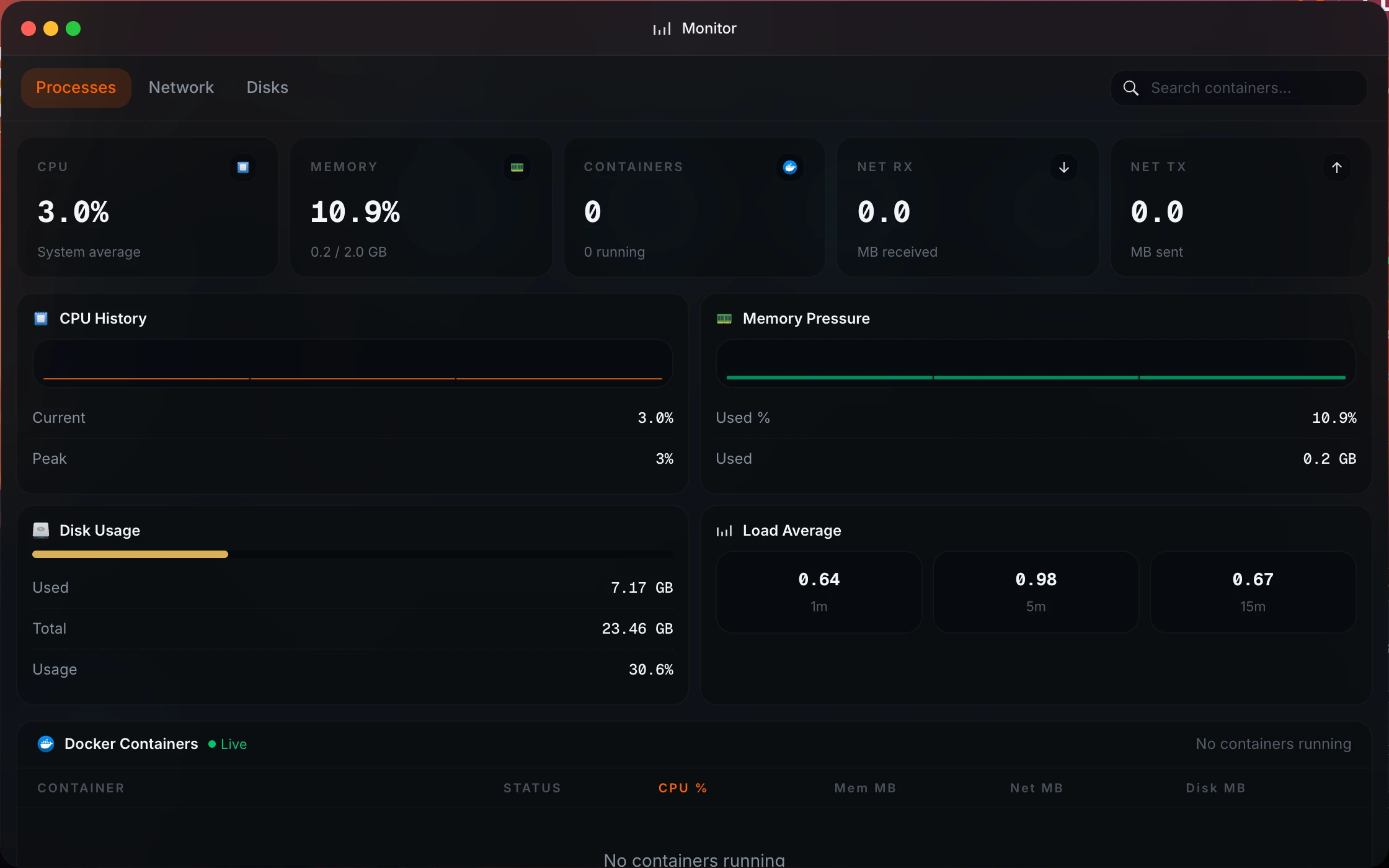
  • Real-time system monitoring: CPU, memory, disk, network, and per-container Docker stats — visible without SSH.
  • Disk and partition manager for formatting drives, mounting volumes, and managing block devices from the UI.
  • Notification system for container crashes, disk warnings, and scheduled task results.
homeio.app
Homeio system monitoring and Docker stack management as an alternative to Dockge

Why Homeio works

Choose Homeio if you want a stronger daily operating surface.

NeedWhy Homeio fits
Docker Compose stack management

Deploy, update, restart, remove, and stream logs for any stack — the same compose-native workflow as Dockge, inside a broader dashboard.

Disk usage at a glance

Real-time disk metrics on the dashboard. No SSH needed to check whether your media drive is filling up.

An app catalog

158+ pre-configured Docker Compose apps. Browse and install without writing YAML from scratch — something Dockge explicitly doesn't include.

Scheduled image updates

The cron runner schedules docker compose pull on any cron schedule with pass/fail notifications. Dockge has no built-in scheduling.

File management alongside stacks

The integrated file manager handles upload, download, code editing, media preview, and USB drive browsing — without leaving the dashboard.

File sharing without extra containers

Create Samba shares directly from the UI. No Samba container to manage separately, no smb.conf to write.

Container log inspection

Live log streaming with level badges and keyword filter. One-click download. Works the same as Dockge's log viewer.

Fewer tools open at once

Stacks, files, monitoring, terminal, disk manager, and notifications in one dashboard. No more switching between Dockge, Glances, and an SSH session.

FAQ

Questions people ask before switching.

Is Homeio an alternative to Dockge?

Yes. Dockge (from the creator of Uptime Kuma) is a really well-built compose stack manager — clean UI, good UX, genuinely solid. But it only manages stacks. No system monitoring, no file manager, no app catalog. If you want to check disk usage after installing something, you SSH in. Homeio covers all of that without abandoning the compose-native model that makes Dockge good.

What does Homeio have that Dockge does not?

Dockge's scope is intentionally narrow: deploy and manage Docker Compose stacks in a browser. Homeio adds: a 158+ app catalog with one-click installs, an integrated file manager with USB drive and Google Drive support, a built-in cron task scheduler, Samba/SMB sharing, a disk and partition manager, real-time CPU/memory/disk/network metrics, and notifications for container crashes and task failures. It's the full home server layer that Dockge deliberately leaves out.

Does Homeio manage Docker Compose stacks like Dockge?

Yes, with the same compose-native model. Deploy, update, restart, remove, and view logs for any stack. Apps from the built-in catalog are also Docker Compose stacks, so everything is managed the same way — there's no distinction between 'catalog apps' and 'your own stacks'.

Does Homeio have a terminal like Dockge?

Yes. Homeio has a web terminal with a configurable command allowlist: docker, ls, cat, df, ping, and more. It's not a full root shell — it's scoped for the maintenance commands you actually use day-to-day without exposing everything through a browser tab.

Who should choose Homeio over Dockge?

If you're happy with Dockge and only want a compose stack manager, stay with Dockge — it's excellent at that. Choose Homeio if you find yourself SSHing in to check disk usage, managing files separately, or wishing you had an app catalog. Homeio solves all of that while keeping the compose-native workflow you already like.

Is Homeio heavier than Dockge?

It uses more resources than Dockge because it does more — but it's still lightweight in absolute terms. Homeio runs as a Docker Compose stack using PostgreSQL for persistence. On an N100 mini PC or a Pi 5, you won't notice the overhead. The apps you run alongside it will use far more resources than Homeio itself.

Can Homeio schedule Docker tasks automatically?

Yes. The cron runner schedules docker compose pull, container restarts, shell commands, and backups on any standard cron schedule. Each task sends a real-time pass/fail notification. Dockge has no scheduling — if you want to pull new images automatically, you'd need to set up a separate cron job via SSH.

Does Homeio show real-time container logs?

Yes. Live log streaming with log-level badges (info/warning/error), keyword filtering, and one-click download. Dockge also has log viewing, so this is roughly equivalent — both work well for debugging a misbehaving container.

Is Homeio free and open source?

Yes. Fully free and open source, runs entirely on your hardware, no cloud dependency.

What hardware does Homeio run on?

Any Linux machine: N100 mini PCs, old desktops, Raspberry Pi 4 or 5, NAS devices on Debian or Ubuntu, or cloud VMs. If Docker runs on it, Homeio runs on it.

Next step

Install Homeio and run your own home cloud with more control.

Keep your apps, files, terminal, and system health in one interface, then follow the comparison pages deeper if you still need to evaluate the options.